
Identity_Verification_Premium
H5-Lite_Pro-Access-Guide
H5-Lite_Pro-Access-Guide
# Access Guide
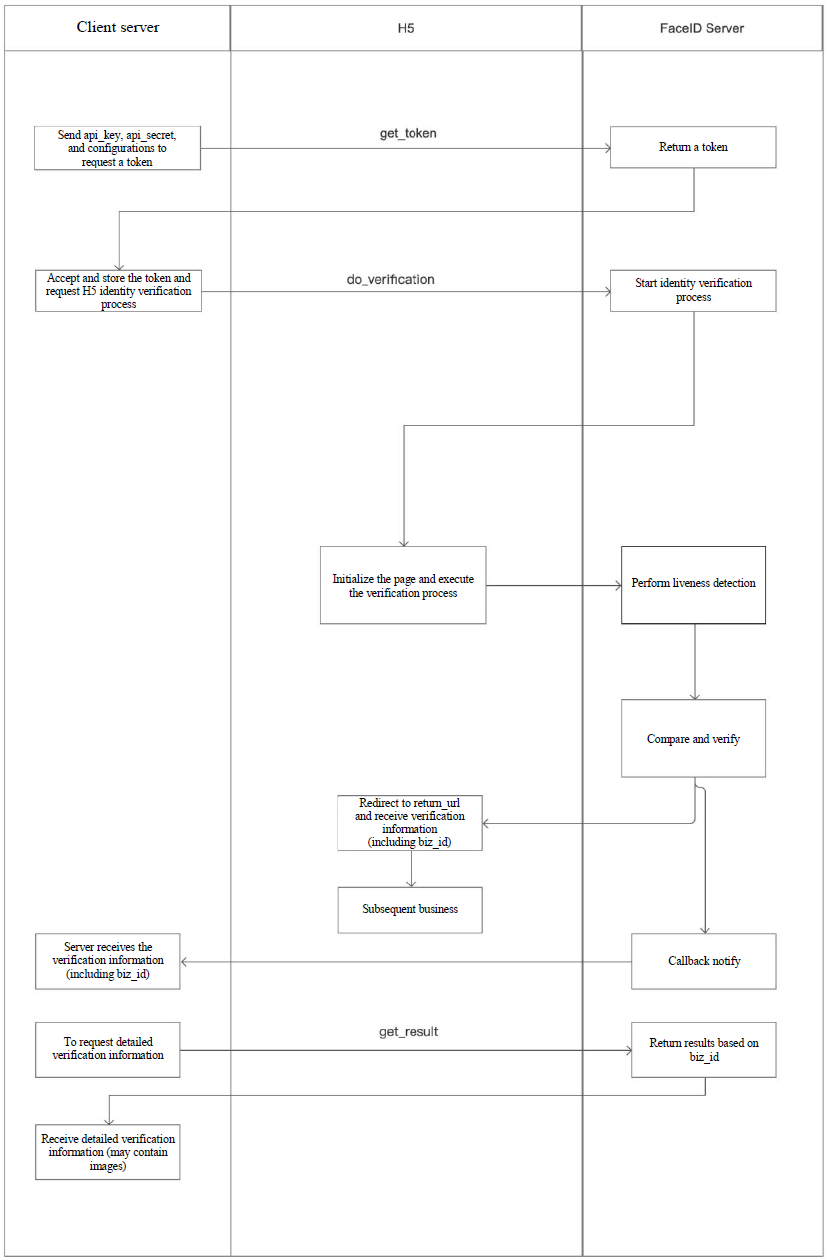
Megvii offers mobile H5 liveness detection for enterprises to verify identities in mobile H5 scenarios. To use this feature, perform the following 3 steps:
- Obtain the api_key and api_secrect in the FaceID console and call the GetToken API with the required parameters to obtain the token;
- Visit the DoVerification address with the token in a browser (https://api-idn.megvii.com/faceid/lite/do?token=xxx).
to go to the verification page provided by Megvii. After verification, the page redirects to the specified return_url. - Call GetResult to view the verification results.
# Flow Chart
 京公网安备 11010802025957号